Introduction: Can You Use Amazon FBA with Shopify?
If you want to build an ecommerce business without packing and shipping every order yourself, combining Amazon FBA with Shopify can be an attractive option.
Amazon FBA, which stands for Fulfillment by Amazon, allows sellers to send inventory to Amazon fulfillment centers. Amazon then stores eligible products, picks and packs orders, and ships them to customers.
Shopify, on the other hand, allows you to build your own online store, manage your products, customize your storefront, and sell directly to customers.
But how to use Amazon FBA with Shopify is a question that requires understanding one important distinction: Amazon FBA and Amazon Multi-Channel Fulfillment (MCF) are related, but they are not exactly the same service.
FBA primarily supports orders placed through Amazon’s marketplace. Multi-Channel Fulfillment allows Amazon to fulfill eligible orders from other sales channels, including your Shopify store.
By connecting Shopify to Amazon’s fulfillment network, you can sell through your own website while using Amazon’s logistics infrastructure to handle eligible orders.
In this guide, you will learn how the system works, how to connect your accounts, how to synchronize inventory, how to automate fulfillment, and what costs to consider before starting.
What Is Amazon FBA and How Does It Work with Shopify?
Before setting up your store, you should understand the roles of both platforms.
What Is Amazon FBA?
Amazon FBA is a fulfillment service that handles logistics for products sold through Amazon.
The process generally involves:
- Selecting products to sell.
- Sending inventory to Amazon fulfillment centers.
- Creating product listings and offers.
- Receiving customer orders.
- Letting Amazon fulfill eligible orders.
- Monitoring inventory, fees, and profitability through Seller Central.
FBA can reduce the amount of time you spend handling individual orders. However, you remain responsible for product selection, business expenses, compliance, and profitability.
What Is Shopify?
Shopify is an ecommerce platform that allows you to create and operate your own online store.
Unlike selling exclusively through Amazon, operating a Shopify store gives you more control over your website design, branding, product pages, and customer shopping experience.
You can learn more about its ecommerce features through the official Shopify website.
How Do Amazon FBA and Shopify Work Together?
When you combine Shopify with Amazon fulfillment, each platform performs a different job.
- Shopify: Displays your products and accepts customer orders.
- Amazon: Stores your inventory and fulfills eligible orders through Multi-Channel Fulfillment.
- Integration app: Connects the systems, maps products, and helps synchronize inventory and order information.
- You: Manage your products, pricing, marketing, customer service, and overall business performance.
For example, imagine you sell a kitchen accessory through your Shopify store.
A customer visits your website and purchases the product. Your connected fulfillment system sends the order to Amazon MCF. Amazon processes the order and ships the product to the customer.
You do not need to pack that individual order yourself.
Amazon explains this process in its official guide to Multi-Channel Fulfillment.
The key benefit: You can use Amazon’s fulfillment network without requiring every customer to purchase directly from Amazon.

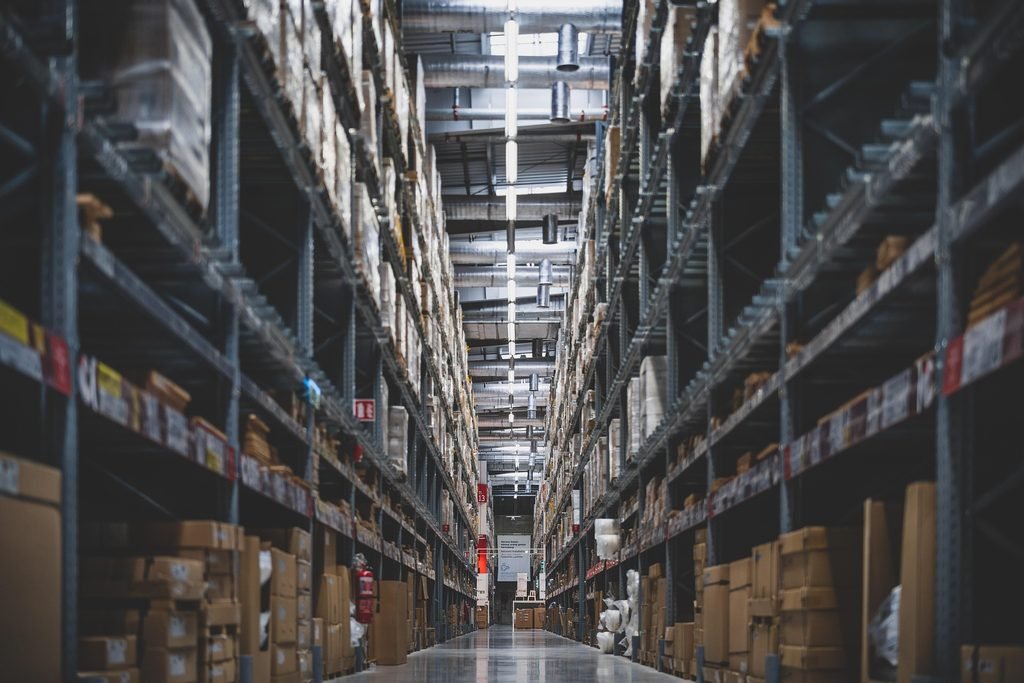
Recommended image: Amazon fulfillment center with warehouse shelves and ecommerce packages.
Free image search: Pexels — Amazon-style fulfillment warehouses
Suggested image filename: amazon-fba-fulfillment-warehouse.jpg
Alt text: Amazon FBA fulfillment warehouse for Shopify ecommerce orders
How to Use Amazon FBA with Shopify: Step-by-Step Guide
Now let’s look at the practical process of connecting your Shopify store to Amazon fulfillment.
Step 1: Create Your Shopify Store
First, create a Shopify store if you do not already have one.
Choose a store name that fits your business and is easy for customers to remember.
Next, configure the essential elements of your store:
- Choose a professional theme.
- Add your logo and branding.
- Create product pages.
- Set up payment methods.
- Configure shipping policies.
- Publish your refund, privacy, and terms policies.
- Add customer support information.
Your product pages should clearly explain what you sell, who the product is for, and why customers should consider buying it.
Use original product descriptions and accurate photographs rather than copying another seller’s entire listing.
You should also calculate your product margins before launching. A product that looks profitable before advertising, fulfillment, and payment processing costs may generate little profit after expenses.
Step 2: Create an Amazon Seller Account
If you intend to sell products on Amazon as well as Shopify, you can create an Amazon seller account and set up FBA.
Your Amazon Seller Central account allows you to manage product listings, inventory, shipments, and fulfillment settings.
If you only want Amazon to fulfill orders from your Shopify store, Amazon also provides an MCF account option for eligible businesses that do not intend to sell through Amazon’s marketplace.
The right account setup depends on your business model and the countries in which you plan to operate.
Before committing to inventory, review the applicable account requirements, selling fees, fulfillment fees, and product restrictions.
Official resource: Amazon Seller Central and selling information
Step 3: Choose Products to Sell
Product selection is one of the most important parts of building a successful ecommerce business.
You need products that customers want, that you can source reliably, and that leave enough profit after all expenses.
When researching products, consider:
Demand: Are customers actively searching for the product?
Competition: Are established sellers dominating the market?
Profit margin: Can you sell the product at a competitive price while covering all your costs?
Size and weight: How will storage and fulfillment fees affect profitability?
Return rate: Is the product likely to generate expensive returns or customer complaints?
Supplier reliability: Can your supplier maintain consistent quality and availability?
Avoid selecting products based only on their popularity. High demand can also attract intense competition and expensive advertising.
You should calculate the expected profit for each product before ordering inventory.
Step 4: Send Your Inventory to Amazon
If you are using FBA inventory for your business, prepare and send your products to Amazon according to the applicable requirements.
Generally, you will need to:
- Create or select the appropriate product listing.
- Add the product to your Amazon inventory.
- Follow Amazon’s packaging and labeling requirements.
- Create an inbound shipment through Seller Central.
- Send the inventory to the designated fulfillment network.
- Monitor the shipment until the inventory becomes available for fulfillment.
You must account for preparation costs, transportation, inbound placement charges where applicable, and other relevant fees.
Important: Inventory that has merely been shipped to Amazon may not yet be available to fulfill customer orders. The stock must reach the appropriate stage in Amazon’s fulfillment process.
If you want Amazon to fulfill orders placed through Shopify, you will also need to configure Multi-Channel Fulfillment.
Recommended image: A seller preparing and labeling product boxes for shipment to a fulfillment center.
Free image search: Pexels — Packing and shipping products
Suggested image filename: preparing-inventory-for-amazon-fba.jpg
Alt text: Preparing ecommerce inventory for Amazon FBA fulfillment
Step 5: Connect Amazon to Shopify
This is the most important technical step in the process.
Amazon provides a Shopify integration for Multi-Channel Fulfillment that allows merchants to connect their Shopify stores to Amazon’s fulfillment network.
Start by reviewing the official Amazon MCF and Buy with Prime Shopify integration guide.
Then follow these general steps:
1. Open your Shopify admin.
Log in to your Shopify account and access your store dashboard.
2. Install the appropriate Amazon integration.
Find the official Amazon Multi-Channel Fulfillment and Buy with Prime app in the Shopify App Store, and check its current availability and regional requirements.
3. Connect your Amazon account.
Open the app and sign in using the Amazon seller account associated with your intended marketplace or fulfillment region.
4. Review your product catalog.
Make sure the products in Shopify correspond to the correct inventory in Amazon.
5. Configure shipping settings.
Choose the shipping options you want to offer customers and map them to the supported Amazon fulfillment speeds.
6. Review fulfillment settings.
Determine whether orders should be submitted manually or processed automatically, based on your business requirements and the available settings.
The integration can simplify order processing, but you should test it before relying on it for every order.
Regional note: The available app and features depend on your country and fulfillment region. Shopify’s current documentation lists specific requirements for its integration, so confirm eligibility before setting up your store.
Step 6: Match Your Shopify Products with Amazon Inventory
Connecting your accounts is not enough. You must also ensure that the correct Shopify products correspond to the correct Amazon inventory.
This process is often called SKU mapping.
A SKU, or Stock Keeping Unit, is an identifier used to distinguish a product or product variant.
For example, suppose you sell a water bottle in three colors:
- Black — SKU
BOTTLE-BLK - Blue — SKU
BOTTLE-BLU - Silver — SKU
BOTTLE-SLV
Each variant should map to the correct Amazon inventory item.
If your Shopify SKU matches the corresponding Amazon SKU, the integration may be able to map the products automatically.
If the identifiers differ, you may need to map the products manually.
Incorrect mapping can cause inventory discrepancies, failed fulfillment requests, or orders being associated with the wrong product.
Before going live, verify that:
- Each product maps to the correct Amazon SKU.
- Each variant has the correct inventory association.
- Inventory tracking is enabled where required.
- Available stock is synchronized correctly.
- Products without available inventory are not mistakenly offered for immediate fulfillment.
Do not assume that the inventory synchronization is correct simply because the accounts are connected.
Step 7: Configure Shipping and Delivery Options
Your Shopify store needs shipping options that match the fulfillment services you have configured.
For example, you might offer standard and expedited shipping, depending on the available Amazon services and your business model.
However, you should not promise a delivery date unless the selected service can reasonably support that promise.
To configure your shipping:
- Open your Shopify shipping and delivery settings.
- Review the shipping profile associated with your products.
- Configure the applicable Amazon fulfillment location.
- Set appropriate shipping rates.
- Map Shopify shipping choices to supported Amazon shipping speeds.
- Review the checkout experience.
Remember that the customer sees the shipping options you configure in Shopify.
Your shipping charges should cover your expected fulfillment expenses while remaining competitive.
Pro tip: Do not offer free shipping automatically. First calculate whether your product margins can support it.

Recommended image: An ecommerce dashboard showing products, inventory, and order management on a computer screen.
Free image search: Pexels — Ecommerce dashboard and online business
Suggested image filename: shopify-amazon-inventory-management.jpg
Alt text: Managing Shopify product inventory and Amazon fulfillment orders
Step 8: Automate Shopify Orders with Amazon MCF
Once your products and shipping settings are configured, you can decide how orders should be submitted for fulfillment.
There are two general approaches.
Manual Order Fulfillment
With manual processing, you review orders and submit eligible orders to Amazon when appropriate.
This approach can be useful when you are starting out and want to verify that everything works correctly.
However, manual processing requires more attention as order volume increases.
Automatic Order Fulfillment
Depending on the integration and your settings, you may be able to automate order processing.
When an eligible Shopify order is placed, the integration can submit the fulfillment request to Amazon. Amazon then processes the order, and tracking information can be returned to Shopify.
Automation can reduce repetitive work, but it does not eliminate your responsibility to monitor orders.
You should regularly check for:
- Failed fulfillment requests.
- Products with insufficient available inventory.
- Incorrect shipping settings.
- Delayed shipments.
- Canceled orders.
- Refunds and returns.
- Inventory synchronization problems.
Before enabling automatic processing for your entire store, place a test order and verify the complete workflow.
Amazon’s official Shopify MCF user guide explains the connection, inventory mapping, shipping configuration, and order processing setup.
How Much Does It Cost to Use Amazon FBA with Shopify?
The cost of combining Amazon fulfillment with Shopify depends on your business model, product characteristics, sales volume, and fulfillment region.
There is no single total cost that applies to every seller.
Your expenses may include the following.
| Expense | What You Need to Consider |
|---|---|
| Shopify subscription | The plan required for your store |
| Amazon selling account | Applicable selling plan and account fees |
| Product sourcing | Manufacturing or wholesale purchasing costs |
| Inbound shipping | Transporting inventory to Amazon |
| FBA or MCF fulfillment | Picking, packing, and shipping orders |
| Inventory storage | Fees for holding products in fulfillment centers |
| Payment processing | Applicable transaction and payment fees |
| Advertising | Costs of attracting customers |
| Returns | Return shipping, refunds, and potential product losses |
| Apps and integrations | Any paid third-party tools you choose to use |
The Amazon MCF and Buy with Prime Shopify app is listed as a free integration, but that does not mean the overall fulfillment service is free.
You should review the current fulfillment rates before calculating your margins.
You can check the official Amazon MCF pricing information to understand the applicable service costs.
Example: Calculating Your Potential Profit
Imagine you sell a product through Shopify for $40.
Your estimated costs per order are:
| Item | Example Cost |
|---|---|
| Selling price | $40.00 |
| Product cost | $10.00 |
| Fulfillment and shipping | $7.00 |
| Payment processing | $1.50 |
| Advertising | $8.00 |
| Other variable expenses | $2.00 |
| Estimated profit before other overhead and taxes | $11.50 |
These figures are illustrative, not actual Amazon or Shopify rates.
In this example, the estimated profit is $11.50 per order before fixed overhead and taxes.
If advertising costs rise or fulfillment becomes more expensive, your profit can decrease quickly.
This is why you should calculate your product economics before investing heavily in inventory.
[AFFILIATE LINK PLACEMENT #1]
Recommended placement: After the cost section.
Suggested anchor text: Explore tools to calculate your Amazon FBA profit and estimate product costs.
Discover the Best Amazon FBA Tools
Use a relevant product research, profit calculation, or ecommerce tool that genuinely helps readers evaluate their business expenses.
Amazon FBA vs. Amazon MCF: What Is the Difference?
One of the most common mistakes beginners make is assuming FBA and MCF mean exactly the same thing.
They are closely related, but the distinction matters when connecting Shopify to Amazon.
| Feature | Amazon FBA | Amazon MCF |
|---|---|---|
| Main purpose | Fulfill eligible Amazon marketplace orders | Fulfill eligible orders from multiple sales channels |
| Amazon marketplace sales | Yes | Not required for MCF orders |
| Shopify order fulfillment | Requires an appropriate MCF setup | Yes, through a supported integration |
| Inventory storage | Amazon fulfillment network | Amazon fulfillment network |
| Picking and packing | Amazon | Amazon |
| Shipping to customers | Amazon | Amazon |
| Shopify integration | Depends on the integration and setup | Designed to support off-Amazon fulfillment |
If you intend to sell on Amazon and Shopify, you may be able to use a shared pool of eligible inventory for both channels.
If you only want Amazon to fulfill orders from your independent Shopify website, an MCF account may be a suitable alternative, depending on your region and business requirements.
Check the applicable Amazon documentation before selecting your account setup.
Benefits of Using Amazon FBA with Shopify
Combining Shopify with Amazon fulfillment offers several potential advantages.
1. Less Manual Shipping Work
Amazon can handle picking, packing, and shipping eligible orders.
This allows you to spend more time on marketing, product development, and customer acquisition.
2. More Control Over Your Store
Shopify gives you control over your storefront’s design, branding, product pages, and customer shopping experience.
You can build your own brand rather than relying exclusively on a marketplace listing.
3. Shared Inventory Across Sales Channels
Where supported and configured correctly, Amazon’s fulfillment network can serve orders from Amazon and other connected ecommerce channels.
This can simplify inventory management.
However, you must monitor stock availability carefully to avoid overselling.
4. Potential for Business Growth
You can attract customers through your website, advertising, social media, email marketing, and other channels.
Amazon’s fulfillment network can support order processing as your business grows, subject to inventory availability and the service’s requirements.
5. More Time to Focus on Marketing
Because you do not need to pack every order yourself, you can concentrate on activities that help generate sales.
These may include search engine optimization, paid advertising, content marketing, and improving product pages.
Important: Outsourcing fulfillment does not guarantee sales or profitability. You still need a strong product, competitive pricing, reliable suppliers, and effective marketing.
[AFFILIATE LINK PLACEMENT #2]
Recommended placement: After the benefits section.
Suggested anchor text: Discover tools that can help you research profitable ecommerce products.
Explore Amazon FBA Product Research Tools
Choose a product research tool that matches your readers’ needs. Explain its actual benefits rather than promising guaranteed profits.
Common Mistakes to Avoid When Using Amazon FBA with Shopify
Even when the technical integration works correctly, operational mistakes can damage your profitability.
Here are some problems worth avoiding.
Mistake 1: Ignoring Fulfillment Costs
A product may appear profitable until you include shipping, storage, advertising, payment processing, and returns.
Calculate the full cost of each order before setting your retail price.
Mistake 2: Choosing Products Without Research
Do not purchase large quantities of inventory simply because a product is trending.
Evaluate demand, competition, pricing, supplier reliability, and expected profit.
Mistake 3: Failing to Match SKUs Correctly
Incorrect product mapping can lead to failed orders or inventory problems.
Check every product and variant before activating automated fulfillment.
Mistake 4: Promising Unrealistic Delivery Times
Delivery estimates depend on the selected service, destination, inventory availability, and other operational factors.
Only display shipping promises that your fulfillment configuration can reasonably support.
Mistake 5: Forgetting About Returns and Customer Service
Using Amazon for fulfillment does not mean you can ignore your customers.
You still need clear policies and a process for handling questions, complaints, refunds, and returns.
Understand which responsibilities belong to you and which are handled by Amazon under your selected service.
Mistake 6: Depending on One Sales Channel
A Shopify store gives you another way to reach customers, but it does not automatically generate traffic.
Consider building a sustainable marketing strategy that includes search traffic, email marketing, and other appropriate channels.
Mistake 7: Skipping the Test Order
A successful account connection does not prove that the entire order workflow works correctly.
Test product mapping, shipping selections, fulfillment submission, tracking updates, and inventory synchronization before relying on automation.
[AFFILIATE LINK PLACEMENT #3]
Recommended placement: After the common mistakes section.
Suggested anchor text: Explore ecommerce automation tools that can simplify your daily workflow.
Find the Best Ecommerce Automation Tools
Link to a relevant integration, inventory management, or ecommerce automation product. Confirm its compatibility and pricing before recommending it.
Is Amazon FBA with Shopify Good for Beginners?
It can be a good option for beginners who want to operate an independent ecommerce store without handling every shipment themselves.
However, the right approach depends on your available budget, experience, and business goals.
It May Be Suitable If:
- You have identified a product with realistic profit potential.
- You can afford the initial inventory investment.
- You want to build your own ecommerce brand.
- You understand the costs associated with fulfillment.
- You are prepared to market your Shopify store.
- You can manage customer service and business operations.
It May Not Be Suitable If:
- You have no budget for inventory or operating expenses.
- You expect immediate sales without marketing.
- You have not researched product demand.
- Your margins are too small to cover fulfillment costs.
- You are unwilling to monitor orders and inventory.
A beginner should start with careful product research and conservative financial projections rather than investing heavily before validating demand.
You can also compare Amazon fulfillment with other logistics providers before making a decision.
How to Improve Your Shopify Store’s Chances of Success
The technical connection is only one part of building a successful business.
You also need a clear strategy for attracting customers and converting visitors into buyers.
Optimize Your Product Pages
Write original product descriptions that explain the product’s benefits, specifications, limitations, and intended audience.
Use clear images, transparent pricing, and helpful answers to common customer questions.
Build Trust
Provide accurate contact information, clear shipping policies, and transparent return terms.
Make it easy for customers to understand who they are buying from and how to contact your business.
Use Search Engine Optimization
Research the terms your potential customers use when searching for your products.
Create useful category pages, improve product descriptions, and ensure your store is accessible to search engines.
Avoid stuffing keywords into your pages. Content should help customers make informed decisions.
Track Your Numbers
Monitor conversion rates, customer acquisition costs, average order value, return rates, and profit per order.
These metrics can help you identify problems before they become expensive.
Test Before Scaling
Start with a manageable product selection and a fulfillment workflow you can monitor.
Once you have reliable sales and understand your margins, you can make better decisions about expanding your catalog or increasing advertising.
[AFFILIATE LINK PLACEMENT #4]
Recommended placement: After the store optimization section, before the conclusion.
Suggested anchor text: Find tools to help you optimize and grow your ecommerce business.
Discover Tools to Grow Your Shopify Store
Choose a relevant SEO, analytics, marketing, or ecommerce tool that offers genuine value to your audience.
Frequently Asked Questions About How to Use Amazon FBA with Shopify
1. Can I use Amazon FBA with Shopify?
Yes. You can use Amazon’s fulfillment network to fulfill eligible Shopify orders through Multi-Channel Fulfillment, provided your account, products, and fulfillment region meet the applicable requirements.
2. Do I need to sell on Amazon to use Amazon fulfillment with Shopify?
Not necessarily. Amazon provides an MCF option for fulfilling orders from other ecommerce channels without requiring you to sell on Amazon’s marketplace.
Your account requirements depend on the service and region you choose.
3. How do I connect Amazon FBA to Shopify?
Start by installing the appropriate Amazon MCF integration, connecting your eligible Amazon account, mapping Shopify products to Amazon SKUs, configuring shipping options, and testing the fulfillment process.
4. Does Amazon automatically ship Shopify orders?
Eligible orders can be submitted automatically when your integration and order processing settings are configured accordingly. You should verify the workflow and monitor fulfillment errors.
5. Does Amazon MCF synchronize Shopify inventory?
The supported integration can synchronize available inventory after the products have been mapped correctly and the required settings have been configured.
Incorrect SKU mapping or inventory settings can cause discrepancies.
6. Is the Amazon Shopify integration free?
The Amazon MCF and Buy with Prime Shopify app is listed as a free integration. However, Amazon fulfillment, inventory storage, Shopify subscriptions, and other business expenses may still apply.
Always check current pricing.
7. Can I use Amazon FBA with Shopify outside the United States?
Potentially, yes, but availability depends on your country, the Amazon fulfillment region, and the integration you select.
Amazon’s Shopify integration supports specific markets, and third-party integrations may be needed in other supported regions. Confirm current eligibility before committing to a setup.
8. Is Amazon FBA with Shopify profitable?
It can be profitable, but profitability depends on your product costs, selling price, fulfillment fees, advertising expenses, returns, and demand.
Calculate your expected profit before purchasing inventory.
9. Can I use Shopify without holding inventory at home?
Yes. With a suitable fulfillment arrangement, your inventory can be stored at Amazon fulfillment centers rather than at your home or office.
However, you must still purchase or otherwise obtain the inventory and arrange for it to reach the fulfillment network.
10. What is the biggest advantage of combining Amazon FBA with Shopify?
One major advantage is the ability to build your own branded ecommerce storefront while outsourcing eligible picking, packing, and shipping operations to Amazon.
This can reduce manual fulfillment work while giving you another channel through which to reach customers.
Conclusion: Is Amazon FBA with Shopify Worth It?
Learning how to use Amazon FBA with Shopify can help you build an ecommerce operation that combines an independent online store with Amazon’s fulfillment infrastructure.
The process involves setting up Shopify, establishing the appropriate Amazon account, preparing inventory, connecting the integration, mapping SKUs, configuring shipping, and testing order fulfillment.
The most important thing to remember is that Amazon FBA and Amazon MCF serve different purposes. If you want Amazon to ship orders placed through Shopify, make sure your setup supports Multi-Channel Fulfillment.
You should also calculate your total costs, choose products carefully, provide a reliable customer experience, and develop a strategy for attracting customers to your store.
Start with a manageable product selection, test the entire fulfillment process, and expand only when your numbers support the decision.
With the right preparation, Amazon fulfillment and Shopify can work together to support a more efficient ecommerce business.