Creating and publishing books through Amazon Kindle Direct Publishing (KDP) can be an appealing way to build a digital publishing business. However, producing activity books requires more than choosing a topic and adding a cover.
Publishers must create engaging activities, organize pages, prepare answer keys, format content for printing, and ensure the finished book meets the intended audience’s needs. For retirement-themed activity books, the challenge is even more specific: the content should feel appropriate for retirement celebrations rather than like a generic puzzle collection.
Retirement Activity Prints is a cloud-based application designed to simplify this process. It helps users generate retirement-themed activities, arrange pages using a visual editor, and export their projects in formats intended for publishing and printing.
But is this tool worth considering for Amazon KDP publishers, digital product creators, and beginners?
In this Retirement Activity Prints review, we’ll examine its advertised features, pricing, potential benefits, limitations, intended users, and whether it deserves a place in your publishing workflow.
Disclosure: This article contains an affiliate link. If you purchase through our link, we may earn a commission at no additional cost to you. Our goal is to provide useful information to help you make an informed decision.
What Is Retirement Activity Prints?
Retirement Activity Prints is a browser-based software application developed by David Tran. It is designed to help users create retirement-themed activity books without building every puzzle and page from scratch.
The software focuses on a specific publishing category: activity books intended for retirees and people shopping for retirement gifts.
These books may contain word puzzles, logic games, coloring pages, visual activities, retirement trivia, party games, and keepsake pages. Instead of assembling these elements individually using several applications, users can create and organize them within a single workspace.
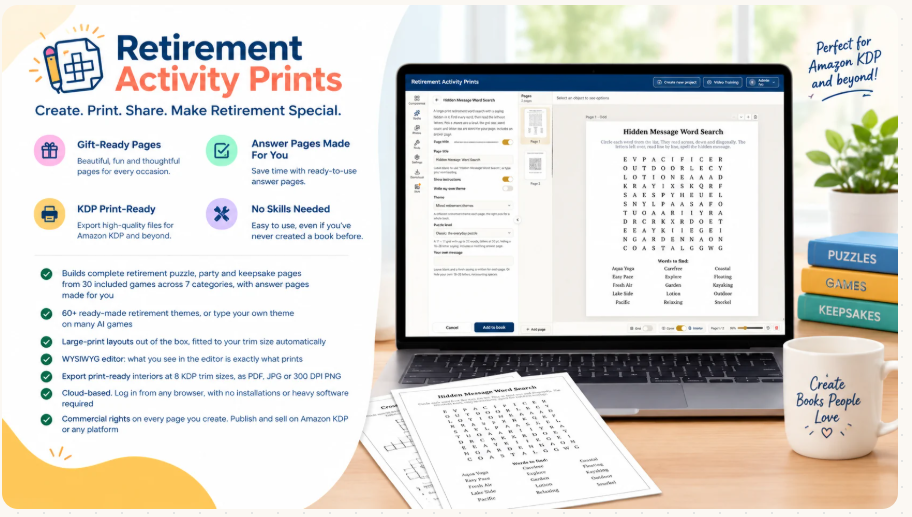
The developer advertises a library of 64 retirement games across seven categories, along with more than 60 ready-made themes. The application also incorporates AI-generated content for selected activities.
Once the pages are arranged, users can export their projects in supported formats and trim sizes intended for Amazon KDP.
This approach may appeal to publishers who want to explore a focused book niche without spending hours designing each page manually.
How Does Retirement Activity Prints Work?
The application is designed around a straightforward publishing workflow.
Rather than beginning with a blank document, users can select activities, customize their themes, arrange the resulting pages, and prepare their books for export.
1. Choose Retirement-Themed Activities
The advertised activity library includes several categories:
- Word puzzles
- Logic games
- Visual puzzles
- Coloring activities
- Retirement trivia
- Party games
- Keepsake pages
These categories allow publishers to create books with different purposes.
For example, a retirement gift book might combine word searches, workplace trivia, humorous activities, and pages where coworkers can leave messages.
A more puzzle-focused book could emphasize word and logic games instead.
The advantage of this approach is flexibility. Publishers can tailor the contents to a particular audience rather than producing the same generic collection for every project.
2. Select a Theme
Retirement Activity Prints advertises more than 60 ready-made themes, including travel, gardening, nostalgia, and office humor.
Themes can help publishers organize books around specific interests.
For example, a gardening-themed retirement book could contain relevant puzzles and activities for someone who plans to spend more time gardening after leaving work.
A travel-themed edition might be suitable for a retiree looking forward to exploring new destinations.
However, choosing a theme does not automatically make a book commercially successful. The finished content still needs to be useful, enjoyable, and appropriate for its intended audience.
3. Generate and Organize Pages
According to the developer, the application generates activity pages with instructions, puzzles, and answer pages where applicable.
Selected AI-powered activities can produce fresh words, clues, sayings, and prompts for different projects.
The software also advertises an option to organize answers at the back of the book, which can be useful for puzzle collections.
This could save time compared with creating every activity and answer key manually.
Nevertheless, AI-generated content should be checked before publication. Incorrect answers, repeated clues, confusing instructions, or unsuitable wording can reduce the quality of a finished book.
4. Customize the Book in the Visual Editor
Retirement Activity Prints includes a visual, drag-and-drop editor.
The advertised editing capabilities include adding text, shapes, and images, as well as managing layers, grouping elements, aligning objects, and undoing or redoing changes.
A visual editor may be especially helpful for beginners who are unfamiliar with professional design software.
Instead of moving between several applications to generate content and arrange individual pages, users can work within a single environment.
5. Export Files for Publishing
The developer advertises eight supported Amazon KDP trim sizes and export options that include PDF, JPG, and 300 DPI PNG.
The software also lists bleed, no-bleed, and trim-guide options.
These features are relevant because printed books must follow the publishing platform’s technical specifications.
However, selecting a supported trim size does not guarantee that a manuscript is ready for publication. Publishers should still review page dimensions, margins, bleed, image quality, page ordering, and other applicable KDP requirements before uploading a finished book.
The ability to export selected pages or an entire project may also help users review their work before preparing the final manuscript.
Retirement Activity Prints Features: What Do You Get?
The following table summarizes the main features advertised by the developer.
| Feature | Advertised Capability | Potential Benefit |
|---|---|---|
| Cloud-based application | Browser access on Mac and Windows | No traditional desktop installation required |
| Activity library | 64 games across seven categories | Multiple activity types for different books |
| Ready-made themes | More than 60 themes | Faster topic selection |
| AI-generated content | Fresh content for selected activities | Less manual writing |
| Visual editor | Drag-and-drop page editing | Easier customization |
| Multi-page workspace | Projects of up to 1,000 pages | Manage larger books in one workspace |
| Answer management | Automatic answer pages and back-of-book organization | More convenient puzzle-book formatting |
| KDP-oriented export | Eight trim sizes | Simplifies preparation for supported formats |
| Export formats | PDF, JPG, and 300 DPI PNG | Multiple output options |
| Monthly downloads | Up to 100 downloads | A defined export allowance |
| Training | In-app training videos | Help for beginners |
| Support | Email support | A contact channel for assistance |
These capabilities suggest that Retirement Activity Prints is intended to combine content generation and page design in one publishing workflow.
The practical value depends on the quality of its generated activities, how much editing is necessary, and whether the export process works reliably for the user’s preferred publishing format.
How Much Does Retirement Activity Prints Cost?
The advertised front-end price is $19.
The launch documentation also lists a four-offer sales funnel with a potential total value of up to $200. However, the available information does not establish the exact price and contents of every additional offer.
Before purchasing, review the checkout page carefully to determine which features are included in the initial purchase and whether optional upgrades are necessary for your intended workflow.
For someone exploring activity-book publishing, a $19 entry price may make the software worth evaluating. However, affordability alone does not establish value.
The more important question is whether the application saves enough time and produces sufficiently good content to justify its cost.
Check the Current Price of Retirement Activity Prints
Who Should Consider Retirement Activity Prints?
The software appears most relevant to people who want to create retirement-themed activity books or related printable products.
Amazon KDP Publishers
Publishers who already produce puzzle books, low-content books, or activity books may appreciate having a specialized tool for retirement-themed content.
Instead of designing every page manually, they can use the advertised generation and editing features to develop a book more efficiently.
However, publishers should research their chosen topics and competitors before creating multiple titles. A specialized tool does not eliminate competition or guarantee sales.
Beginners Exploring Book Publishing
People with limited design experience may find the combination of activity generation and visual editing appealing.
The software is designed to reduce the need to create every puzzle, instruction, and answer page from scratch.
Beginners should still learn the basics of book formatting, content quality, publishing policies, and niche research.
Digital Product Sellers
The developer identifies digital product marketplaces such as Etsy, Gumroad, and Payhip as potential destinations for products created with the software.
This could provide another use case for people interested in downloadable activity sheets or retirement party materials.
However, users should verify the software’s commercial-use terms and each marketplace’s applicable rules before selling their creations.
Retirement Party Planners and Families
The software may also be useful for people creating a personalized retirement gift.
A book containing workplace trivia, group activities, and keepsake pages could provide a more personal alternative to a generic gift.
These users may care more about personalization and convenience than about building a publishing business.
Retirement Activity Prints Pros and Cons
No software is right for every user. Based on the advertised features, here are the main advantages and limitations to consider.
Pros
1. A specialized niche
The application focuses on retirement activity books rather than general-purpose documents.
That specialization may help users develop books around retirement gifts, celebrations, and personal interests.
2. Multiple activity categories
The advertised library includes word puzzles, logic games, coloring activities, trivia, and other formats.
This variety could make it easier to create different types of books within the same niche.
3. AI-assisted content generation
Generating selected activities and related text could reduce some of the manual work involved in producing a book.
4. Integrated page editing
The built-in visual editor is intended to reduce the need to move between separate design tools.
5. Publishing-oriented export options
The advertised trim sizes and export formats may simplify parts of the preparation process for print publishing.
6. Beginner-oriented training
The inclusion of training videos and email support may help users who are unfamiliar with the application.
Cons
1. The output still requires quality control
AI-generated puzzles and clues can contain errors. Every activity should be checked before publication.
2. A specialized tool does not guarantee sales
Success on Amazon KDP depends on multiple factors, including product quality, market demand, competition, pricing, and discoverability.
3. The advertised features need practical verification
Without independently testing the software, it is not possible to confirm its actual ease of use, generation speed, reliability, or output quality.
4. There is a learning curve
Even a beginner-friendly editor requires time to understand. Users must also learn the publishing process and review their finished books.
5. Export limits may matter to high-volume users
The advertised allowance is up to 100 downloads per month. Users with demanding production workflows should determine whether that allowance meets their needs.
6. Commercial publishing involves additional responsibilities
Users must review content for originality, accuracy, intellectual property concerns, and compliance with applicable publishing-platform rules.
Can You Make Money With Retirement Activity Prints?
This is an important question for anyone considering the software as part of an Amazon KDP business.
The application is designed to help create products. It does not guarantee that those products will generate income.
A retirement activity book could appeal to people shopping for gifts for parents, friends, colleagues, or recently retired coworkers. However, the existence of a potential audience does not establish how many buyers are available or how difficult it will be to reach them.
Before investing significant time in production, consider the following steps.
Research the Market
Search Amazon for retirement activity books, retirement puzzle books, and related gift products.
Examine competing books, their presentation, customer feedback, pricing, and the needs they appear to address.
Look for opportunities to create a genuinely useful product rather than simply producing another book that resembles existing titles.
Focus on the Intended Buyer
The person using a retirement activity book may not be the person purchasing it.
A coworker buying a farewell gift may value personalization and humor. A family member shopping for a retired parent may prioritize readability and activities suited to the recipient’s interests.
Understanding these different motivations can help you create a more relevant product.
Check the Quality of Every Page
Review the generated activities, answer keys, instructions, typography, page layout, and overall consistency.
Large print and appropriate page spacing are particularly important for a comfortable reading experience.
Do not assume that every generated page is ready to publish without editing.
Calculate Your Actual Profit
Your profit depends on more than the number of books you publish.
Consider the selling price, printing costs, applicable Amazon fees, advertising expenses, taxes, and other business costs.
The number of books created is not a reliable measure of profitability. What matters is whether customers want the finished products and whether the resulting revenue exceeds the costs.
Explore Retirement Activity Prints for Book Creation
Retirement Activity Prints vs. General Design Tools
One question potential buyers may have is whether they need a specialized application or could use a general-purpose design tool instead.
The answer depends on what they want to create.
| Consideration | Retirement Activity Prints | General Design Software |
|---|---|---|
| Main purpose | Retirement-themed activity books | Broad range of design projects |
| Activity generation | Advertised built-in generation features | Depends on the software and workflow |
| Retirement themes | Specialized ready-made themes | Usually requires manual selection or customization |
| Page editing | Built-in visual editor | Varies by application |
| Answer pages | Advertised automatic answer-page functionality | May require manual creation |
| Publishing preparation | Advertised KDP-oriented export options | Depends on available export settings |
| Flexibility | Focused on its intended use cases | Can support a wider variety of projects |
A specialized application may be more convenient for users who repeatedly create retirement activity books.
A general-purpose design tool may be preferable for people who need greater flexibility across many types of projects.
The best choice depends on the user’s preferred workflow, required features, and willingness to perform manual work.
Is Retirement Activity Prints Beginner-Friendly?
The application is marketed toward beginners and people who do not have advanced design skills.
Its cloud-based workflow, visual editor, ready-made themes, and activity-generation features are intended to make book creation more accessible.
However, beginner-friendly software does not remove the need to understand the final product.
A new publisher still needs to check page layouts, ensure activities make sense, prepare an appropriate cover, research the market, and follow Amazon KDP’s publishing requirements.
For that reason, beginners should view Retirement Activity Prints as a potential production aid rather than a complete publishing business in a box.
The most useful approach is to create a small project first, review every page, and understand the export process before committing to a larger publishing plan.
Is Retirement Activity Prints Worth $19?
At the advertised $19 front-end price, Retirement Activity Prints may be worth considering for people who specifically want to create retirement-themed activity books.
Its proposed combination of activity generation, themed content, visual editing, answer-page management, and publishing-oriented exports addresses several tasks involved in creating this type of book.
The value proposition is less compelling for people who only want to create one simple printable or who already have an efficient production workflow.
Before buying, consider these questions:
- Do you plan to create more than one retirement-themed book?
- Would automated activity generation save you meaningful time?
- Are the available editing and export features suitable for your projects?
- Are you comfortable reviewing and correcting AI-generated content?
- Does the initial offer include the functionality you need?
- Have you researched the demand and competition for your intended book topics?
If the answers are favorable, the software could be a useful tool to investigate.
Remember that the advertised 30-day money-back guarantee is a purchasing safeguard, not a guarantee of business results. Review the seller’s terms to understand how refunds work.
View the Retirement Activity Prints Offer
Frequently Asked Questions
What is Retirement Activity Prints?
Retirement Activity Prints is a cloud-based application designed to help users create retirement-themed activity books using generated activities, a visual editor, and publishing-oriented export options.
How much does Retirement Activity Prints cost?
The advertised front-end price is $19. Optional upgrades may be offered through the sales funnel. Check the current checkout page for the complete pricing details.
Can Retirement Activity Prints create books for Amazon KDP?
The developer advertises eight KDP trim sizes and export options including PDF, JPG, and 300 DPI PNG. You should still verify that your final files meet the platform’s current publishing requirements before uploading them.
Does Retirement Activity Prints use AI?
Yes. According to the product description, selected activities use AI to generate words, clues, sayings, and prompts.
Can beginners use Retirement Activity Prints?
The application is marketed toward beginners and includes a visual editor and training videos. However, users still need to review their content and learn the basics of publishing.
Can I sell the books I create?
The developer advertises commercial rights for books and pages created with the application. Review the applicable license and terms before selling your products.
Does Retirement Activity Prints guarantee Amazon KDP sales?
No. The software provides tools for creating content, but it does not guarantee demand, visibility, sales, or profit.
Is there a money-back guarantee?
The developer advertises a 30-day money-back guarantee. Check the current offer’s terms for eligibility and refund procedures.
Is Retirement Activity Prints suitable for Etsy sellers?
The developer identifies digital product sellers as a potential audience. Before listing products, confirm that your intended use is permitted by the software’s license and the marketplace’s current policies.
Is Retirement Activity Prints worth buying?
It may be worth considering if you regularly create retirement-themed activity books and want to streamline content generation and page design. Buyers should evaluate the included features, output quality, and their publishing goals before purchasing.
Final Verdict: Should You Consider Retirement Activity Prints?
Retirement Activity Prints targets a specific publishing task: creating retirement-themed activity books without building every page manually.
Its advertised features include a varied activity library, ready-made themes, AI-assisted generation, a visual editor, answer-page management, and KDP-oriented export options.
These capabilities could be useful for Amazon KDP publishers, digital product creators, and people who want to produce personalized retirement gifts.
However, several important considerations remain. Generated content needs quality control, publishing requirements must be checked, and commercial success depends on customer demand rather than software features alone.
Our verdict: Retirement Activity Prints looks promising for people whose publishing plans align with its specialized features. At the advertised $19 entry price, it may be worth evaluating, provided the included functionality meets your needs and you understand that the tool does not guarantee sales.
If you are exploring retirement activity books as a publishing category, compare the advertised features with your actual requirements before making a decision.